
Everything Mediara Vault does
This page describes the app as it is built today. Anything that is planned but not yet in the app is listed at the bottom, under what isn’t built — and nothing on this page is behind a paywall. The free app contains every feature here.
- Records & timeline
- Medications
- Documents & text
- Vitals & wearables
- Check-in & insights
- Care Modes
- Emergency Card
- Family & caregiver
- Search
- Share with Doctor
- Reminders
- Security
- Accessibility
- Requirements
- What isn’t built
Records and the health timeline
The Records tab holds eight tiles: seven record types plus Medical History, which is the merged timeline of all of them.
| Record | What it holds |
|---|---|
| Medical events | Anything that happened, across 17 kinds chosen from a searchable sheet — illness, chronic flare, injury, adverse reaction, hospital stay, emergency or urgent care, surgery, procedure, test or investigation, screening, diagnosis, therapy or rehab, mental health, dental, eye, observation and other. Each carries a title, status, start and end dates, severity, notes, an attending doctor, a follow-up date that schedules a reminder, and optional clinical detail (hospital, specialty, body site and side, treatment, outcome, report number). |
| Medications | Name, dose, frequency, food timing, course dates and supply count. See medications below. |
| Prescriptions | The paper prescription as you got it — photographed page by page, or imported as a PDF — with the doctor, diagnosis and date, and links to the medicines it prescribed. |
| Doctor visits | Doctor and/or hospital, specialty (type-ahead across 93 specialties — typing “heart” finds Cardiology), date and time, reason and notes. Appointment and follow-up reminders are set from the same form. A future-dated visit is an appointment; there is no separate list. |
| Vaccinations | Vaccine, dose number, date administered and/or a due date — a due date schedules a reminder. Certificates attach as documents. |
| Allergies | Allergen, type, the reaction and a colour-coded severity. Active allergies appear on the Emergency Card and are checked whenever you add a medicine. |
| Documents | Photos and PDFs of anything medical. See documents below. |
Conventions that apply to every record
- Type-ahead from an offline catalog. 2,571 curated entries covering medicines, conditions, vaccines, allergens, procedures, lab tests, specialties and symptoms. Typo-tolerant (“parecetamol” finds Paracetamol) and brand-aware (a brand name fills in its generic). Free text is always allowed.
- Records link to each other. A medication can point at the prescription and the visit it came from; an event can gather the prescriptions, medicines, visits, vaccinations and allergies it belongs with, each with a note on how they relate.
- Attachments. Photos and PDFs can be attached to a medication, event, prescription, visit, allergy or vaccination — while you are creating the record, or any time afterwards. You can also point at a document you already have, which links it rather than copying it.
- Voice dictation in every long free-text field, with the microphone inside the field so the words land where you tapped.
- Deleting is never instant. Every delete goes to the Recycle Bin and is restorable for 30 days.
When you save a medicine, the app compares its name against your recorded allergies and your other active medicines. It is deliberately conservative and name-based — a heads-up asking you to check, not a clinical drug-interaction database. An exact or contained name is reported as a duplicate; a merely shared word names the word and asks you to confirm it isn’t the same medicine twice.
Medications, doses and refills
Set a schedule once and reminders start immediately — no relaunch, no separate reminder screen.
- Frequencies that match real prescriptions: daily times, chosen weekdays, day cycles (21 on / 7 off), tapering courses, or as-needed with a daily cap.
- One-tap dose logging from the Today screen, the medications list, or the reminder notification itself. Mark as taken records the dose in the background without opening the app; Snooze 30 min works even with the app closed. Both are idempotent, so a dose can’t be double-counted.
- Adherence as a percentage and a streak, over a 30-day calendar you can tap into, with a full filterable dose history behind it.
- Refill warnings from the supply count, plus an optional weekly missed-dose digest.
- A dose that falls due while the app is open is announced in the app as well, on a banner with Mark as taken, Skip and Later — not only in a notification shade you may not be looking at.
Two deliberate limitations: dose amounts are free text, so the app does no unit arithmetic across medicines; and there is no clinical interaction checker, by design.
Documents, and reading the text inside them
Capture pages with the camera, pick several from the gallery, or import a PDF. On the capture tray you can zoom a page, hold and drag to reorder, or remove one. Several photos become one document, combined into a single PDF in your order.
- Categories: Prescription, Lab Report, Scan / Image, X-Ray, Vaccination Record, Other.
- Text recognition runs on the phone using Google’s on-device ML Kit. Images are never uploaded, and the decrypted temporary image used for recognition is shredded afterwards.
- PDFs are read intelligently. Most emailed lab reports and pharmacy receipts are born digital — the text is already in the file, so it is taken verbatim rather than guessed at. Only genuinely scanned pages go through recognition, one page at a time, and progress counts the work rather than the document (“Reading page 3 of 5 scanned pages”). You can stop and resume without losing what has already been read.
- Interrupted captures come back. Pages are written through to an encrypted draft as you take them, so if Android reclaims the app while the camera holds the foreground, they are offered back next time you open the screen.
- The stored file is never modified. Sharing hands out your original, with no page markers and no text overlay; the extracted text is an in-app companion.
- Export goes through the system share sheet only. The decrypted copy is staged in the app’s private temporary directory purely for the hand-off and deleted straight after, so plaintext health data is never written to shared storage.
Limits that apply to everyone: a single imported file may be up to 50 MB, and text extraction from an imported PDF covers the first 40 pages — which the app states while it works and again when it finishes, rather than letting the remainder drop out of search silently. Photos are downscaled to 2,000 px when picked.
Vitals, wearables and Health Connect
Entered by hand
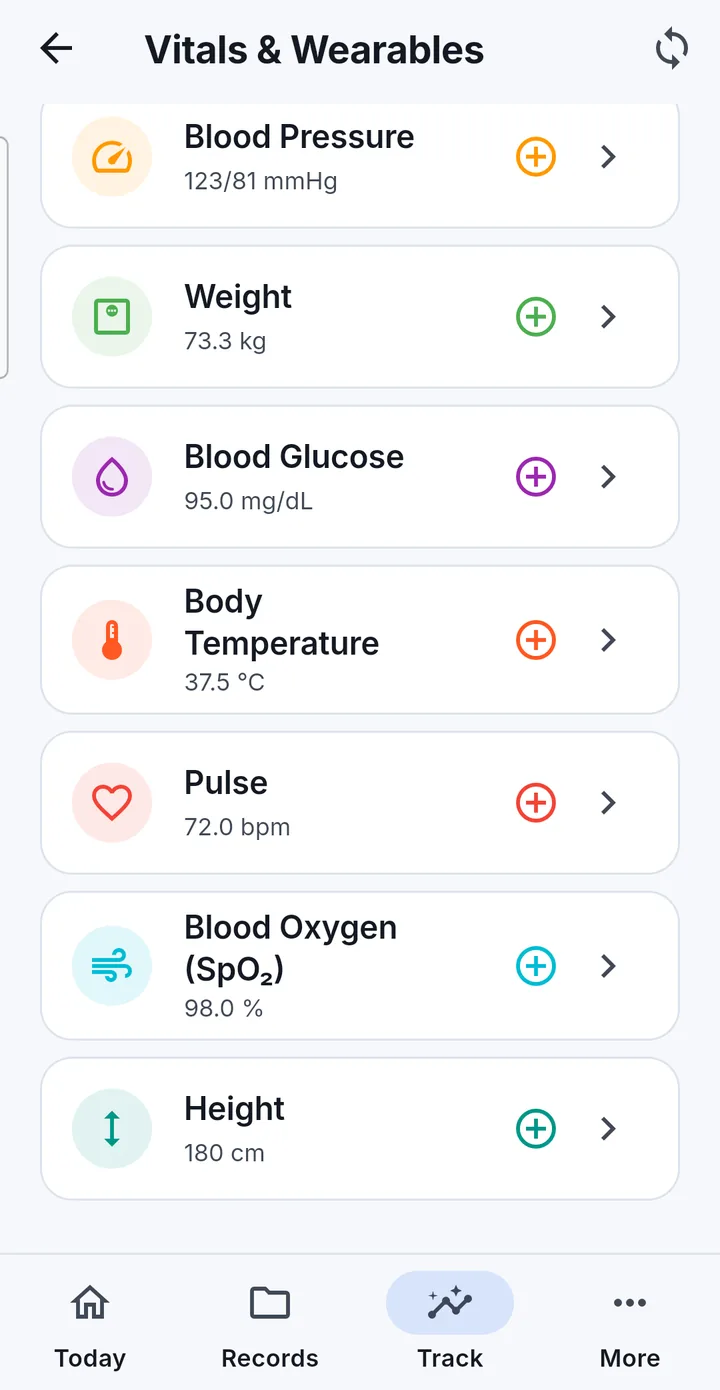
Blood pressure, weight, blood glucose, body temperature, pulse, blood oxygen (SpO2) and height, with no setup at all. Each opens a full history: day, week, month and year ranges, a summary of the period, an interactive chart, and readings listed under Today / Yesterday / date headings. Weight history shows a BMI card once a height exists. Units follow your settings — kg or lb, cm or ft-in, °C or °F, mg/dL or mmol/L, km or mi.
A reading is labelled against a published general range (Normal, Elevated, High, Low). The app never suggests an action from it, and the same thresholds drive Health Insights, so the two surfaces cannot disagree.
Synced from a watch, ring, band or scale
Mediara Vault reads from Android’s Health Connect, which is where your wearable’s companion app already writes. 11 measurements sync: steps, heart rate, blood oxygen, sleep, body temperature, distance, active calories, blood pressure, weight, glucose and height.
- The app declares exactly one read permission per measurement, plus history. It never requests write access.
- Granting “access to past data” lets the first sync backfill up to three years.
- Data syncs when you open the app, when you open the Vitals screen, and on Sync now. It is not a continuous background sync.
- Multi-source days are de-duplicated, and whole-day summary records that some apps write are detected so hourly charts and daily totals stay truthful.
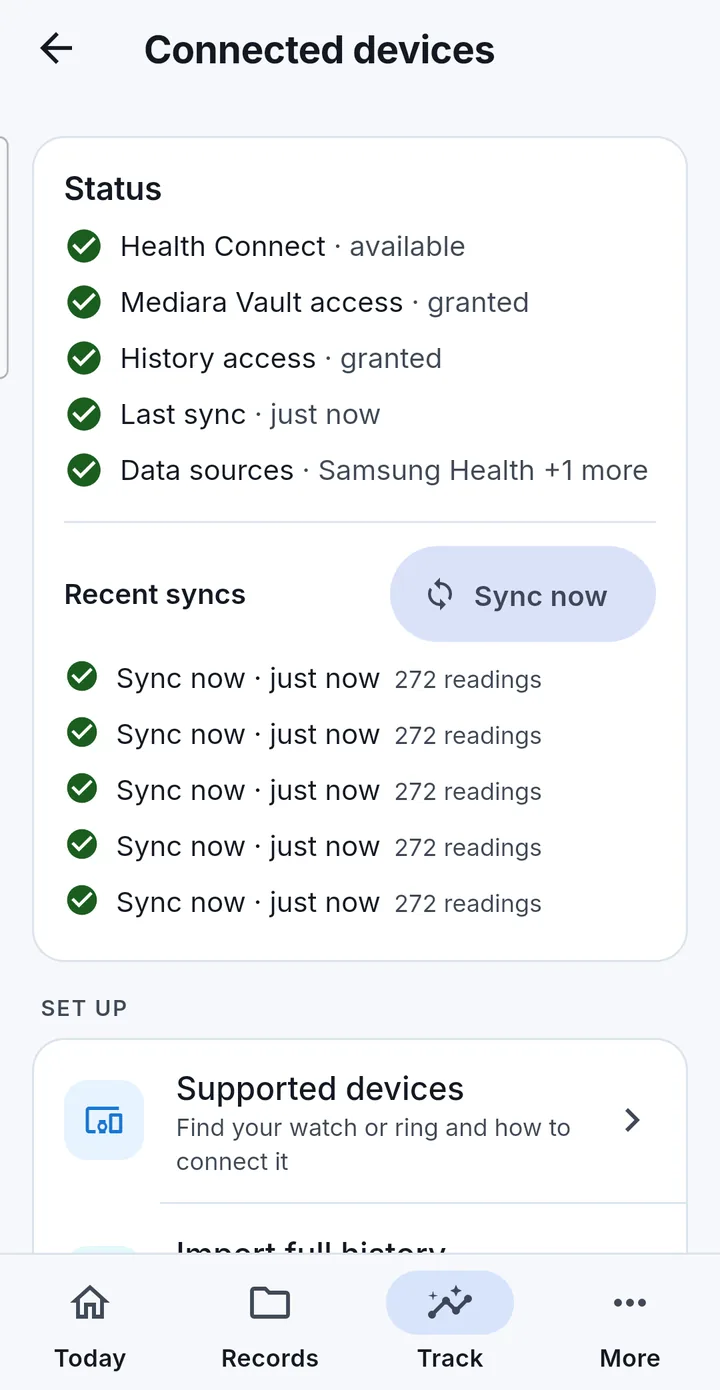
Connected devices
A hub that exists because this chain — watch → companion app → Health Connect → Mediara Vault — usually breaks in the middle:
- Supported devices: a searchable guide to 15 brands (Samsung, Google/Fitbit, Garmin, Xiaomi, Amazfit, OnePlus/OPPO, Huawei, Polar, COROS, Suunto, Nothing/CMF, Oura, Ultrahuman and more) each with a setup wizard for the companion-app chain.
- Check my connection: a seven-point automated check against your device’s real state — is Health Connect installed, are permissions granted, is any app writing data, which one, is recent data present.
- Troubleshooting written symptom-first (“my steps are missing”, “sync stopped”).
- Import full history in two modes: top-up, which fills gaps, or a clean re-import, which wipes previously synced rows and pulls everything again. Manual entries are never touched by either.
Measurement reminders
Per-vital schedules — “weight daily at 07:00”, “blood pressure every Monday”. Tapping the notification opens the right entry form directly.
Daily check-in, conditions and insights
- Daily check-in — a mood, energy 1–5, pain 0–10, symptoms tagged from suggestions or your own, and optional dictated notes. One per day, editable all day.
- Symptom journal — recent entries plus a seven-day trend of mood, energy and pain, with a manager for renaming and archiving your custom symptoms.
- My Conditions — toggle any of 12 conditions and care contexts you live with (diabetes, hypertension, asthma, thyroid, heart disease, chronic pain, surgery prep, surgery recovery, pregnancy, elder care, rehab, other). Each active one gets a dashboard assembling the vitals, adherence and check-in summaries that matter for it.
- Health Insights — pattern detection that runs entirely on the device over your own numbers. Rules include critical and elevated blood pressure, elevated blood pressure during an active pregnancy, fever within 30 days after surgery, elevated glucose, a weight-gain trend, worsening pain, mood decline, energy drop, an adherence drop, and symptoms appearing after a new medicine starts. Every card explains “why am I seeing this?” and can be dismissed.
Insights are arithmetic on numbers you entered, compared against published general ranges. They are not diagnoses, are not personalised to you, and can be wrong — because an entry was mistyped, a sensor mis-measured, or a general range does not apply to you. A reassuring screen is not medical clearance and an alarming one is not a diagnosis.
Care Modes: pregnancy and surgery
A Care Mode is a time-bounded companion — start, live dashboard, end wizard, history — that reorganises tracking around a life event. Everything a mode creates lives in your normal records, shows up in the timeline and search, and survives after the mode ends.
Pregnancy
Start from your LMP or due date; the gestational-age engine does the rest.
- Gestational-age ring and a “This Week” card covering weeks 4–42
- Weight against IOM gestational weight-gain bands; blood pressure and glucose with pregnancy-aware flags
- Kick counter, contraction timer, hydration tracking
- A NICE-aligned antenatal checklist, where each item offers Book visit and creates a real doctor-visit record linked back to it
- Risk flags that add targeted checklist items, an ultrasound gallery, a journal, a danger-signs guide, and per-pregnancy reminder settings
- Past pregnancies are kept and any two can be compared; the end-of-pregnancy wizard has a deliberately gentle path for pregnancy loss
Surgery
Pick from a 33-type surgery catalog, each with type-aware recovery windows, and the surgery date.
- Countdown before, recovery ring after, and a “right now” phase card
- A phase timeline: prehab, pre-op, admission, post-op, recovery
- A prep checklist gated by how much runway is left — fasting, medication stops, pre-op tests — plus questions-for-surgeon and hospital-bag sheets
- Pain log, temperature with a 38 °C fever flag, an encrypted wound-photo series, steps against your pre-op baseline, SpO2 and pulse
- A recovery journal, surgery history with anesthesia-type carry-over, and two PDF presets: an admission pack and a recovery handover
Modes never recommend actions. They organise your own tracking and point you to your care team for decisions; danger-sign screens tell you when to call a professional, they do not triage.
Emergency Card
Blood group, allergies, current medications, conditions and emergency contacts with tap-to-call, on one screen. Sections are composed automatically from your records so they stay current, and any section can be frozen to hand-written text instead.
- An emergency-services button that dials your region’s number — 112, 911, 000, 119 and so on, driven by the Region setting — after an explicit confirmation.
- Optionally readable without the app’s biometric. Turn it on and an Emergency Card button appears on Mediara Vault’s own lock screen, so someone holding your unlocked phone can read the card — and only the card.
The app cannot put the card on Android’s keyguard and does not try to: someone must already have unlocked the phone. The option also only does anything when the app’s biometric unlock is turned on, because that is the lock it bypasses. It is off by default, it is a deliberate exposure, and the app asks you to confirm it in those words. Verify that the emergency number shown matches your locality — the regional numbers are bundled defaults.
Family profiles and caregiver mode
- Each profile has fully separate records, reminders, Emergency Card and relevant settings. Reminders fire for every profile, not only the one you are looking at.
- Switching is instant from the profile sheet on the Today screen.
- Creating a profile for someone else asks you to confirm, at that moment, that you are authorised to manage their data.
- Deleting a profile moves it and all its data to the Recycle Bin, restorable for 30 days, then purged completely — files, search entries and audit payloads included.
- Caregiver (read-only) mode is set per profile. The app shows a “Caregiver view — read only” banner and removes every add, edit and delete control app-wide. Turning it back off requires biometric or device authentication, so a child cannot simply switch it off.
This is local family management on one phone. There is no remote sharing and no cloud caregiver access — see what isn’t built. There is no limit on how many profiles you keep, and profiles you already have are never locked — see pricing.
Search
Full-text search across every record type, prescriptions, custom symptoms, Care-Mode entries, and the text recognised inside your documents. New records and freshly extracted text are searchable the moment they are saved. Filter chips narrow by record type, an optional date range narrows by time, and your last ten searches are kept on the device. Search is prefix-based — “para” finds Paracetamol — and non-Latin text is supported.
Share with Doctor
A curated, printable PDF summary you hand to a clinician. It is the app’s only outbound path for a readable copy of your records, and it is always something you start.
Sections print in this order, and every one has its own checkbox: emergency info and contacts, medications, prescriptions, allergies, doctor visits, vaccinations, medical history, then the pregnancy and surgery reports as appendices. Those last two only appear when the profile actually has one on record, and an excluded report is never even assembled.
Three presets exist for handovers: a surgery admission pack, a surgery recovery handover, and a pregnancy summary. The PDF is generated on your phone and passed to Android’s share sheet — save it, print it, email it, message it. The app uploads nothing.
Reminders and notifications
Medication doses, appointments and follow-ups with a lead time, vaccination due dates, measurement reminders, Care-Mode reminders, an optional missed-dose digest and optional new-insight alerts.
- Quiet hours (off by default) defer a reminder inside the window to the end of it — never drop it. Left off, every reminder fires at its real time, including overnight, which is what a night-time antibiotic needs. Turn them on in Settings and pick your own window.
- Discreet notifications hide medicine names (“Time for a scheduled dose”) and keep lock-screen previews private.
- Reminders survive reboots and app updates, are timezone-aware so travel doesn’t shift your doses, and re-check themselves on every app open.
- If notifications are switched off, or exact alarms are denied, the Today screen shows a persistent banner whose button deep-links to the right system screen — because a reminder that silently cannot fire is the worst failure this app has.
Aggressive battery optimisation on some phones can delay notifications for apps it considers asleep. If reminders arrive late, set Mediara Vault to unrestricted in Android’s battery settings. The schedule also extends itself seven days at a time, so an app left completely untouched for well over a week should be opened once.
Security, privacy and your data
- Encrypted database (whole-file, SQLite3MultipleCiphers) with the key held in the device’s secure hardware-backed keystore, and AES-256-GCM encrypted files for every document and photo.
- Biometric unlock with device-credential fallback, and a lock timeout from immediate to 60 minutes or never.
- Hide app contents (off by default — turn it on in Settings → Privacy) blocks screenshots and blanks the app in the recent-apps switcher.
- An audit log of every data change — hash-chained and tamper-evident, bounded to 180 days or 50,000 entries, readable from Settings.
- Recycle Bin — every delete is a soft delete for 30 days, including whole profiles. Restoring re-schedules reminders and re-indexes search.
- Crash reports are off unless you turn them on, and even then are written to the phone only, never transmitted. There is no crash SDK and no endpoint.
- Android’s own backup and device-to-device transfer are switched off for this app, so nothing rides an OS channel the app does not control.
The full security & privacy page
Accessibility and everyday quality
- Screen readers: controls are labelled, and composite tiles announce a sentence (“Doses today: 3 of 7 taken, 4 left”) rather than a bare number.
- Large text: layouts are verified at 200% font scale, with automated overflow guards on key screens.
- Dark mode and a contrast-checked colour system where colour is never the only carrier of meaning.
- Voice dictation gives a hands-free path into every notes field. It requires on-device speech recognition — if your phone cannot do it locally, dictation is disabled with an explanation rather than sending your audio to a network service.
- Troubleshooting tools that repair rather than reset: resync reminders, rebuild the search index, re-sync or re-import Health Connect, and export a technical app log that contains no health data.
Read the accessibility statement, including the gaps it does not claim to have closed.
What you need
| Platform | Android 8.0 or later. iOS is not available. |
|---|---|
| Health Connect | Optional. Built into Android 14+, a Play Store app on earlier versions. Needs at least one app writing data into it, such as Samsung Health, Google Fit/Health, Garmin Connect or Mi Fitness. |
| Google account | Optional, and only for Drive backups. Everything else works without one. |
| Internet | Optional. Needed only for Google sign-in, Drive backup and restore, and downloading a speech pack if your phone needs one for dictation. |
| Language | English only in this release. Units, regional emergency numbers and date formats are configurable regardless. |
What isn’t built
Listed here because a feature page that only says yes is not useful. None of the following is in the app today.
| Feature | Status |
|---|---|
| Structured lab results | Planned. Lab reports are stored as documents today — scanned, searchable and attachable — but nothing in the app parses numeric lab values, reference ranges or per-analyte trends. |
| AI features of any kind | Not built. There is no AI summarisation, no chat or Q&A, and no health data is sent to any AI service. The only machine learning in the app is on-device text recognition. |
| iOS / Apple Health | Not available. Android only. |
| Cloud sync between devices | Not built — it would need a server, which the app deliberately does not have. Backup and restore is the cross-device path. |
| Remote caregiver or doctor access | Not built, for the same reason. Sharing today means handing someone a PDF, or managing profiles on your own phone. |
| Home-screen widgets | Not built. There is no widget of any kind. |
| Other languages | Not in this release — English only, deliberately. |
| Plaintext CSV or JSON export | Considered and declined. An unencrypted complete medical export sitting on disk would undo the rest of the design. The encrypted .mediara backup file is the full-data export. |
Every feature above is free for three months.
No limits on what you store. After three months a yearly subscription keeps you adding and updating records — and everything you have saved stays readable whatever you choose.
Mediara Vault is a personal record-keeping app. It does not diagnose, treat or give medical advice, and it is not a substitute for talking to a healthcare professional. In an emergency, call your local emergency number. Read the full medical disclaimer.